Code Workspace
Code Overview: Testing an API with httpx and FastAPI
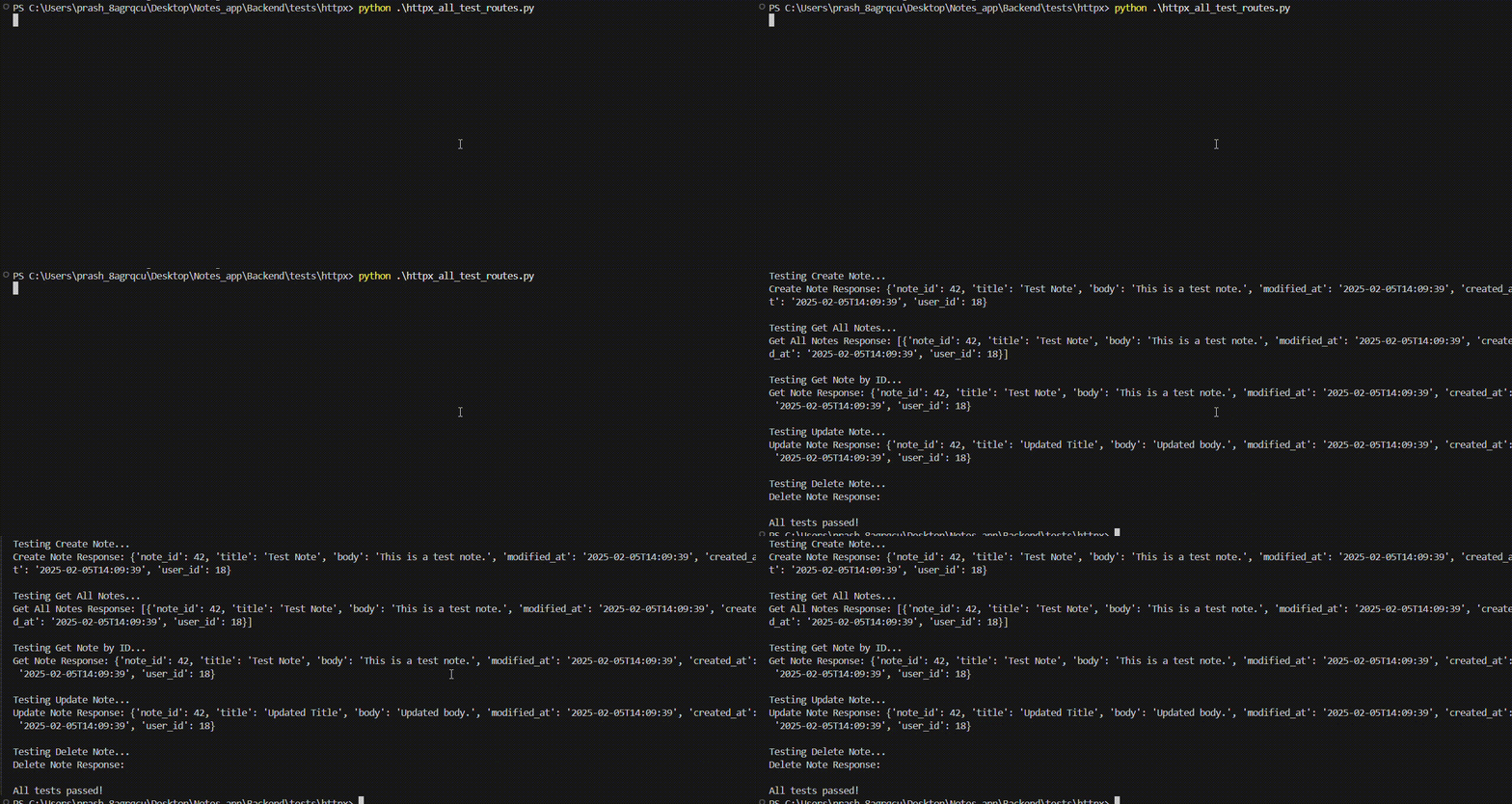
This Python script demonstrates how to write integration tests for a RESTful API using the httpx framework and FastAPI. It provides a comprehensive example of testing user registration, authentication (login), token refreshing, and CRUD operations on notes.

Purpose
The purpose of these tests is to validate the functionality of the Notes App API by simulating HTTP requests using the httpx library and verifying the responses. These tests cover:
- Registering a new user.
- Logging in and generating access.
- Refreshing an access token.
- Creating a new note.
- Fetching all notes for a user.
- Retrieving a specific note by its ID.
- Updating an existing note.
- Deleting a note.
Each test ensures that the API adheres to expected behavior, including proper status codes, response data, and database interactions.
Key Components
1. Imports
import asyncio
import httpx
from fastapi import status
from schemas.user import UserCreateDTO, RefreshTokenDTO
from schemas.note import NoteCreateDTO
asyncio: Enables asynchronous programming for handling non-blocking I/O operations.httpx: A modern HTTP client for making asynchronous HTTP requests.status: Provides HTTP status codes for assertions.UserCreateDTO,RefreshTokenDTO,NoteCreateDTO: Pydantic models used for validating request payloads.
2. Constants
BASE_URL = "http://localhost:8000"
TEST_USER = {
    "username": "testuser",
    "password": "testpassword",
    "full_name": "Test User"
}
BASE_URL: The base URL of the API being tested.TEST_USER: A dictionary containing test user credentials for registration and login.
Code Overview
1. Registering a User
async def register_user():
    """Test user registration."""
    async with httpx.AsyncClient(base_url=BASE_URL) as client:
        response = await client.post(
            "/register/",
            json=UserCreateDTO(**TEST_USER).dict()
        )
        assert response.status_code == status.HTTP_200_OK, f"Failed to register user, got {response.status_code}"
        assert response.json() == {"message": "User created successfully"}, f"Unexpected response: {response.json()}"
- Purpose: Validates the registration of a new user via a
POSTrequest. - Key Steps:
- Send a
POSTrequest to/register/with valid user data (username, password, and full name). - Verify that the response status code is
200 OKand the message confirms successful user creation ({"message": "User created successfully"}).
- Send a
2. Login and Token Generation
async def login_and_get_tokens():
    """Test user login and token generation."""
    async with httpx.AsyncClient(base_url=BASE_URL) as client:
        response = await client.post(
            "/token/",
            data={"username": TEST_USER["username"], "password": TEST_USER["password"]}
        )
        assert response.status_code == status.HTTP_200_OK, f"Login failed, got {response.status_code}"
        tokens = response.json()
        assert "access_token" in tokens, "No access_token found in the response"
        assert "refresh_token" in tokens, "No refresh_token found in the response"
        assert tokens["token_type"] == "bearer", "Token type is not 'bearer'"
        return tokens
- Purpose: Validates the login process and retrieval of access and refresh tokens.
- Key Steps:
- Send a
POSTrequest to/token/with valid credentials. - Verify that the response contains both
access_tokenandrefresh_token, and that the token type isbearer.
- Send a
3. Token Refresh
async def refresh_access_token(refresh_token):
    """Test refreshing an access token."""
    async with httpx.AsyncClient(base_url=BASE_URL) as client:
        response = await client.post(
            "/refresh/",
            json=RefreshTokenDTO(refresh_token=refresh_token).dict()
        )
        assert response.status_code == status.HTTP_200_OK, f"Failed to refresh token, got {response.status_code}"
        new_tokens = response.json()
        assert "access_token" in new_tokens, "No new access_token found"
        assert new_tokens["token_type"] == "bearer", "Token type is not 'bearer'"
- Purpose: Validates the ability to refresh an access token using a refresh token.
- Key Steps:
- Use the
refresh_tokenobtained during login to send aPOSTrequest to/refresh/. - Verify that the response contains a new
access_tokenand that the token type isbearer.
- Use the
4. Creating a Note
async def create_note(client, access_token):
    """Test creating a note."""
    print("\nTesting Create Note...")
    response = await client.post(
        "/note/",
        json=NoteCreateDTO(title="Test Note", body="This is a test note.").dict(),
        headers=get_headers(access_token)
    )
    assert response.status_code == status.HTTP_200_OK, f"Failed to create note, got {response.status_code}"
    note = response.json()
    assert "note_id" in note, "Note ID not found in response"
    print("Create Note Response:", note)
    return note["note_id"]
- Purpose: Validates the creation of a new note via a
POSTrequest. - Key Steps:
- Send a
POSTrequest with valid data and authentication headers. - Verify the response status code and payload.
- Return the
note_idfor further testing.
- Send a
5. Fetching All Notes
async def get_all_notes(client, access_token):
    """Test fetching all notes."""
    print("\nTesting Get All Notes...")
    response = await client.get("/note/all", headers=get_headers(access_token))
    assert response.status_code == status.HTTP_200_OK, f"Failed to fetch notes, got {response.status_code}"
    notes = response.json()
    print("Get All Notes Response:", notes)
- Purpose: Validates fetching all notes for an authenticated user via a
GETrequest. - Key Steps:
- Send a
GETrequest to/note/allwith authentication headers. - Verify the response contains the correct number of notes and their details.
- Send a
6. Fetching a Specific Note
async def get_note_by_id(client, access_token, note_id):
    """Test fetching a specific note by ID."""
    print("\nTesting Get Note by ID...")
    response = await client.get(f"/note/{note_id}", headers=get_headers(access_token))
    assert response.status_code == status.HTTP_200_OK, f"Failed to fetch note, got {response.status_code}"
    note = response.json()
    print("Get Note Response:", note)
- Purpose: Validates fetching a specific note by its ID via a
GETrequest. - Key Steps:
- Send a
GETrequest with the note's ID and authentication headers. - Verify the response contains the correct note details.
- Send a
7. Updating a Note
async def update_note(client, access_token, note_id):
    """Test updating a note."""
    print("\nTesting Update Note...")
    response = await client.put(
        f"/note/{note_id}",
        json=NoteCreateDTO(title="Updated Title", body="Updated body.").dict(),
        headers=get_headers(access_token)
    )
    assert response.status_code == status.HTTP_200_OK, f"Failed to update note, got {response.status_code}"
    updated_note = response.json()
    print("Update Note Response:", updated_note)
- Purpose: Validates updating an existing note via a
PUTrequest. - Key Steps:
- Send a
PUTrequest with updated data and authentication headers. - Verify the response reflects the updated details.
- Send a
8. Deleting a Note
async def delete_note(client, access_token, note_id):
    """Test deleting a note."""
    print("\nTesting Delete Note...")
    response = await client.delete(f"/note/{note_id}", headers=get_headers(access_token))
    assert response.status_code == status.HTTP_204_NO_CONTENT, f"Failed to delete note, got {response.status_code}"
    print("Delete Note Response:", response.text)
- Purpose: Validates deleting a note via a
DELETErequest. - Key Steps:
- Send a
DELETErequest with the note's ID and authentication headers. - Verify the response status code and that the note no longer exists in the database.
- Send a
Main Test Runner
async def run_tests():
    """Run all tests sequentially."""
    try:
        await register_user()
        tokens = await login_and_get_tokens()
        access_token = tokens["access_token"]
        await refresh_access_token(tokens["refresh_token"])
        async with httpx.AsyncClient(base_url=BASE_URL) as client:
            note_id = await create_note(client, access_token)
            await get_all_notes(client, access_token)
            await get_note_by_id(client, access_token, note_id)
            await update_note(client, access_token, note_id)
            await delete_note(client, access_token, note_id)
        print("\nAll tests passed!")
    except AssertionError as e:
        print(f"Test failed: {e}")
    except Exception as e:
        print(f"An error occurred: {str(e)}")
- Purpose: Orchestrates the execution of all test functions in sequence.
- Key Features:
- Handles exceptions and prints appropriate error messages.
- Ensures tests are executed in a logical order.
Entry Point
if __name__ == "__main__":
    asyncio.run(run_tests())
- Executes the
run_testsfunction when the script is run directly.
Output